
Part 1
I have been given a laptop computer for work but when I work at home I sometimes use my home desktop computer. I decided I needed some way of synchronising files between the two machines, so that I could easily keep both up to date.
Both machines have Bluetooth, which I could use to transfer the odd file manually, but I decided I needed something I could automate. All of the bluetooth syncing software I could find was designed for transferring between a computer and a phone, not between 2 computers.
I found other solutions which expected the files to be on a networked drive, but would keep local copies available for editing. I can't change the network settings on my work computer so it would be tricky for me to set up something like that.
The only solution I could think of was to use FTP to copy the files between the machines. One computer would run an FTP server while the other would run some sort of backup software which would synchronise the files.
I found 2 programmes which looked suitable:
- Cerberus FTP Server. I'd used this a few years ago and it was fairly easy to set up.
- SyncBack. This comes in free and paid-for versions. The free version seemed to do everything I needed.
Both the programmes were fairly straightforward to install. Then came the tricky bits - setting up the computers to talk to each other.
Both computers can access the Internet through our router, and both would normally get assigned automatic IP addresses. I needed a fixed name or address to use, so that the laptop could find the server, so I set the desktop machine to request a fixed IP address from the router. I did this by opening the 'Wireless Network Connection Status' in windows by double-clicking on the wireless network icon which Windows places in the 'tray' in the taskbar. Clicking on 'Properties' then 'Internet Protocol (TCP/IP)' then 'Properties' again got me to a screen where I could specify an IP address.
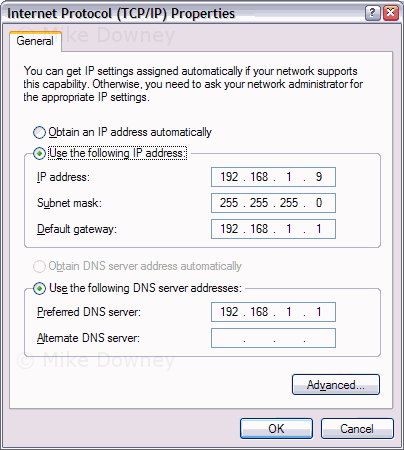
IP addresses on my network start at 192.168.1.1 for the router and .1.2 onwards for any computers. I chose .1.9 because it's unlikely that we would have 8 computers connected, so that address should always be free.
Read Part 2.